WebPrims CRM
The CRM that follows up for you
Most small businesses in India lose work not because the enquiry never came, but because nobody rang back. The lead arrives on WhatsApp, somebody means to call, and four days later the customer has bought from whoever called first.
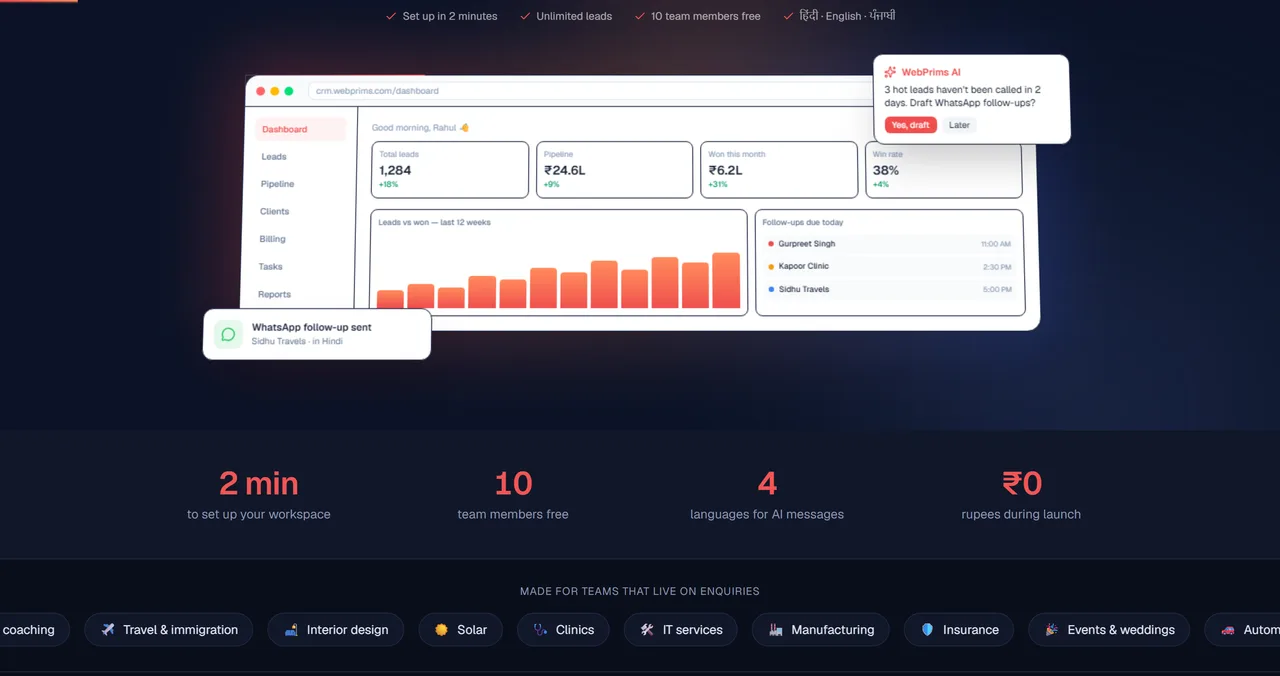
So this one is built around the follow-up rather than the database. Leads come in from a website form, from ads and from WhatsApp, get assigned the moment they land, and anybody who has not been called in two days turns up on the dashboard with an AI assistant offering to draft the message — in Hindi, English or Punjabi, because that is the language the customer wrote in.
Free during launch, with unlimited leads and ten team members, and built the same way we teach it: Next.js on the front, role-based access and an audit trail underneath.
- Leads captured from a website form, ad campaigns and WhatsApp into one pipeline
- Assigned the moment they arrive, with one-tap call and WhatsApp from the row
- An AI assistant that names who has gone cold and drafts the follow-up
- Follow-up messages in Hindi, English and Punjabi, not only English
- GST invoices raised from the client record, so billing is not a second system
- Dashboard, Leads, Pipeline, Clients, Billing, Tasks and Reports in one place
- Role-based access, multi-business support and a full audit trail
- Existing lists imported from CSV or Excel rather than typed again
Live · free during launch · unlimited leads, 10 team members
The same ground is covered on our Full Stack Web Development course.